Physician scheduling softwareThe schedule that builds
itself around your group.
Providers enter their days off and preferences in the app. VitalScheduler turns those and your group's rules into a complete schedule in one click, so next month takes minutes instead of hours.
Requests in, schedule out
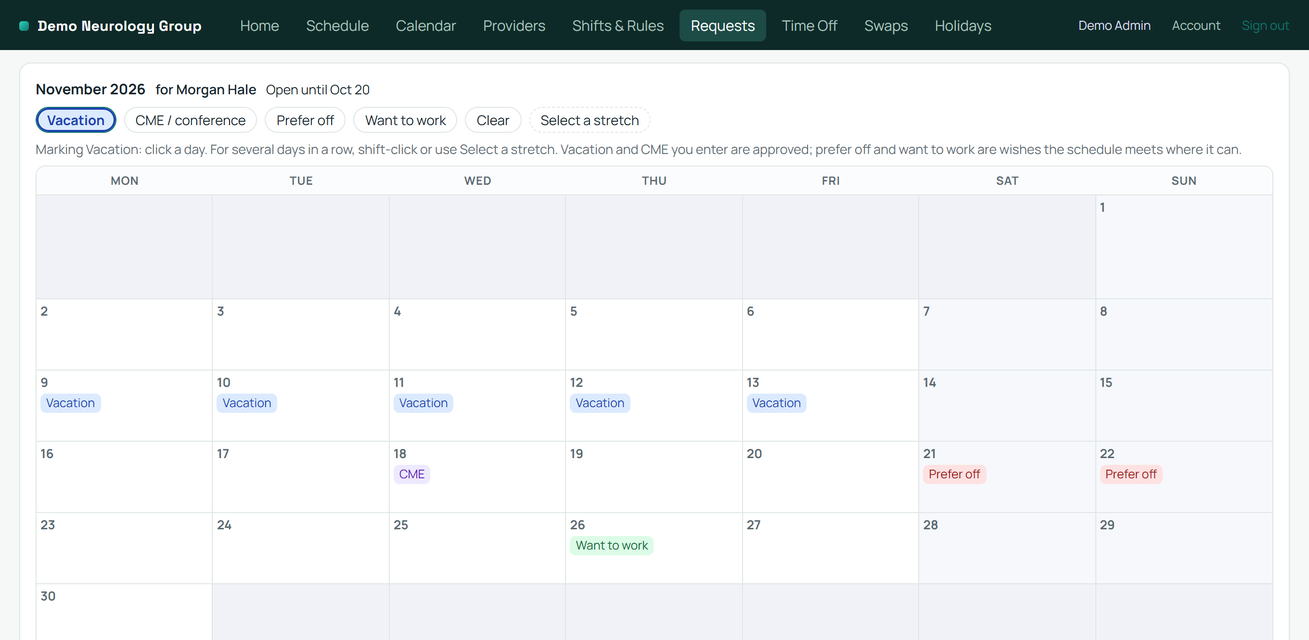
Open requests for a month and each provider marks their vacation, CME, the days they'd prefer off and the days they want to work, plus standing wishes like no Tuesdays. Everyone gets an email when requests open. You see who hasn't entered yet, and after each build, which requests were met.
One click builds the month
Describe your rotations and rules once. Click Generate and a constraint solver builds the whole month in under a minute: call, shifts, clinics, and week blocks, filled together.
On everyone's phone and calendar
Providers see their own shifts on their phones and in their calendar (Apple, Google, Outlook). Publish a change and everyone's calendar updates.
Swaps and time off in the app
Providers request time off and propose trades in the app, with a warning before they propose if a trade would break a rule. You approve with one click. No group texts, no stale spreadsheets.
Your rules, never broken
7 on and 7 off, night call that follows the day attending, "not more than once every 8 weeks" with different spacing per provider. Hard rules are never broken; preferences bend only when they must.
Balanced in the background
Nights, weekends, and holidays are spread by FTE across the year, and a report counts any date range you pick. Export a color-coded Excel grid or a printable PDF whenever you need one, or import the spreadsheet you keep today.
See what everyone asked for, and what they got
Each provider marks vacation, CME, and the days they'd prefer off or want to work, no reason needed. Every build shows how many requests it met and names the ones it couldn't, so the conversation after the schedule goes out starts with facts.
Set up in an afternoon, not a quarter
- Pick your specialty. Start from one of ten presets, or describe your group in plain English and let AI draft your rotations and rules for you to review.
- Paste your roster. Names, part time status, roles and emails. AI fills in the table and you review it.
- Open requests. Everyone enters their days off and preferences for the month, or you paste the email thread and confirm each request.
- Generate. The solver builds the month under your rules and around the requests. Publish when it looks right, and every provider's calendar fills in.
Emergency MedicineHospitalist / Inpatient IMOutpatient ClinicICU / Critical CareAnesthesiaOB/GYNRadiologyGeneral Surgery / OrthoNeurology GroupResidency Program
Residency programs: work-hour limits are built into the generator, and every resident sees their hours and their fair share within their class before the month starts. How it works for programs
Building call by hand today? Our step by step guide covers coverage, rules, requests, fairness and post-call days, with or without software. How to build a physician call schedule
Built for medical groups, deliberately boring about data
Encrypted connections, isolated per group, recent backups kept by our host, and no patient information anywhere in the system, by design. Read the plain English version on our security page.
One price for the whole group
Every plan includes everything. Adding a provider never changes your bill within a plan, and paying yearly gets you two months free.
- Up to 15 providers$79 a monthor $790 a year
- 16 to 40 providers$179 a monthor $1,790 a year
- 41 or more providers$299 a monthor $2,990 a year
- Residency programs, any size$99 a monthor $990 a year
Free for 60 days, no card. If your group grows into the next plan, the new price starts at your next renewal, never mid-month.